the shelf — 8 tools
Don't take my word for it. Try them.
Every tool here is something I designed and built myself. Each window below is an interactive preview of the tool, not the tool itself, so click around. Where the real thing is released, you can download it or open it.
fig. 01 — password manager
LocalPass
Early releaseA password manager that never leaves your computer.
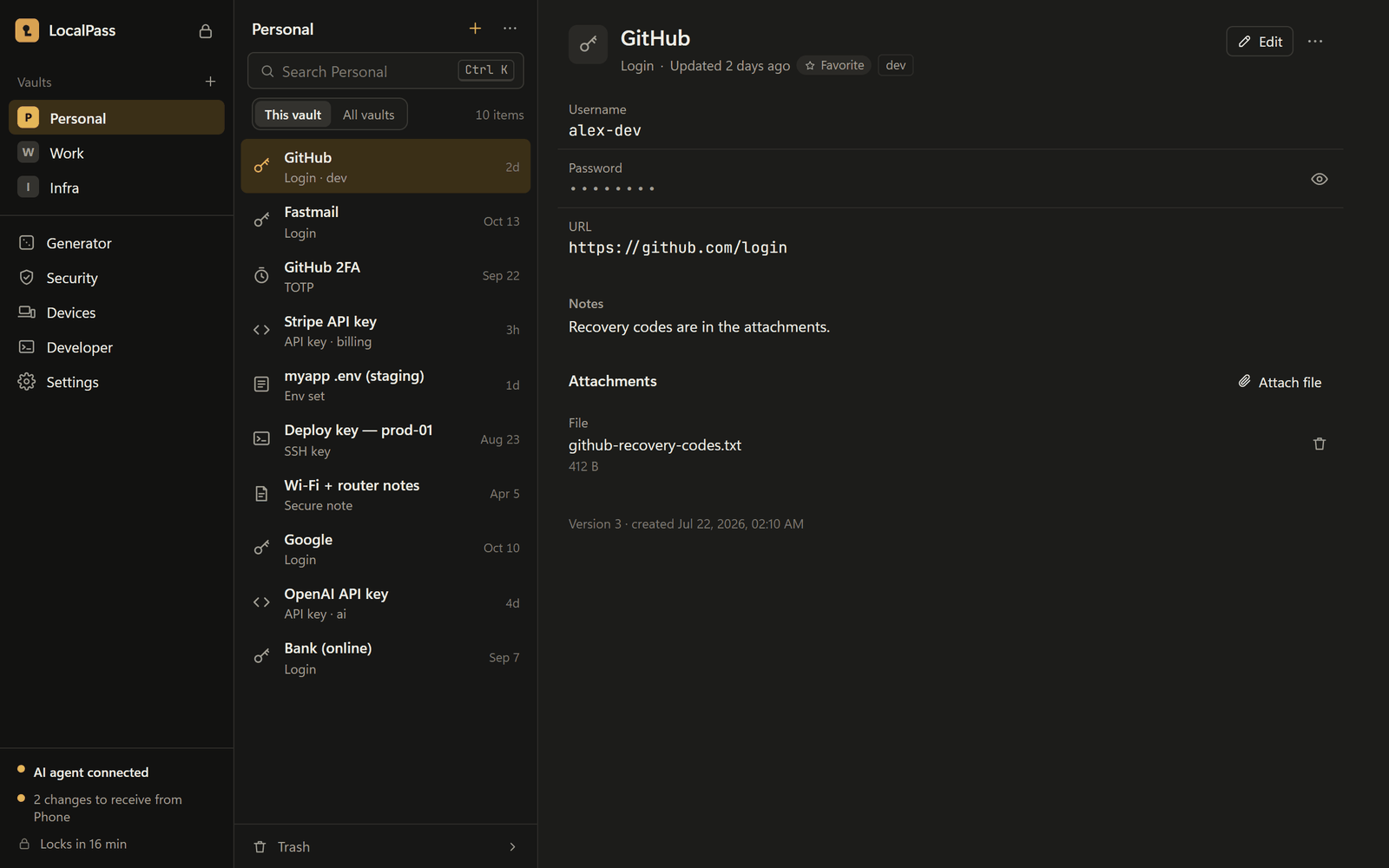
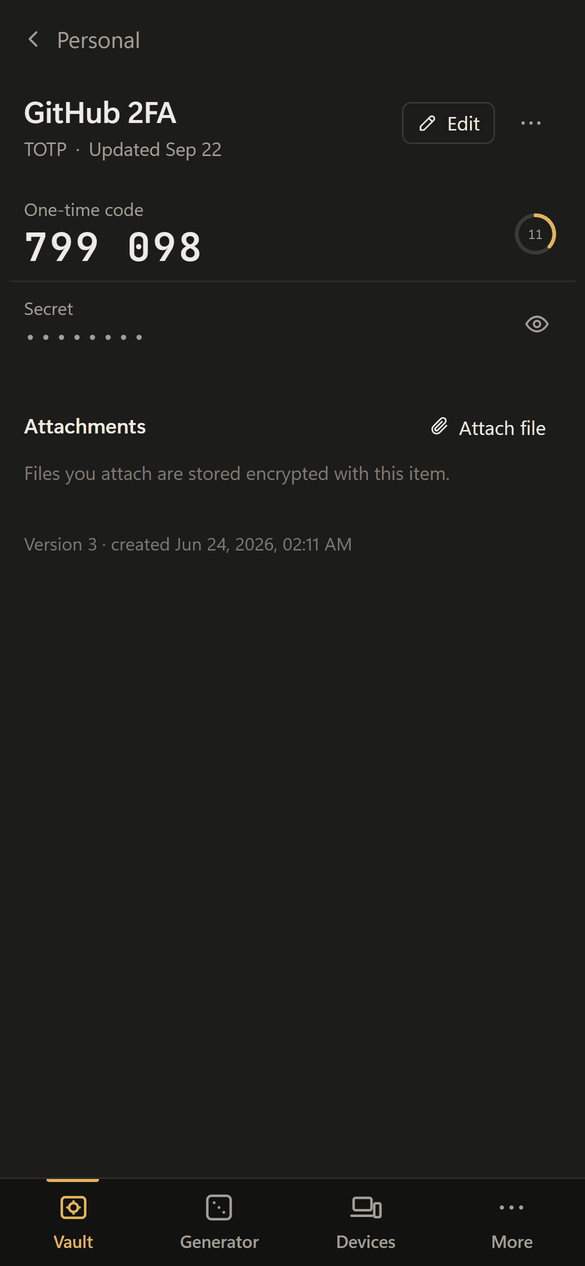
LocalPass keeps your passwords, sign-in codes and secret keys in an encrypted vault on your own device. There is no cloud account and no subscription, so nobody else is ever holding your logins.
The real app
Yours alone
The vault is encrypted on your device. There is no company server to be breached.
Everything in one click
Passwords, live two-factor codes and a strong-password generator, with a report on weak or reused ones.
Made for AI assistants
AI coding tools can use a secret to do a job without being shown what it is. Keep the vault locked when an assistant is reading untrusted content.
- Windows and Android
- Open source
- 800+ automated tests
Version 0.2.1 · released November 7, 2026 · all files
An early version (0.2), not yet independently audited: fine to explore, not yet for your real passwords. Windows shows a SmartScreen prompt because the installer isn't code-signed yet.
How it's builtRust, Tauri, Svelte
- Vaults are encrypted with XChaCha20-Poly1305 under an Argon2id key. Unlocking needs the master password and a secret key generated on the device, so guessing the master password is not enough to open a stolen vault file.
- Devices sync through a folder you choose, using a hash-chained, signed log of operations. There is no server to trust.
- A built-in MCP server lets AI agents run commands with secrets injected and then redacted from the output. The values themselves are never returned.
- About 820 Rust tests across eight crates, signed in-app updates, a strict content-security policy and no telemetry.
fig. 02 — web browser
Veltriva Browser
Early accessA browser that tidies up after you.
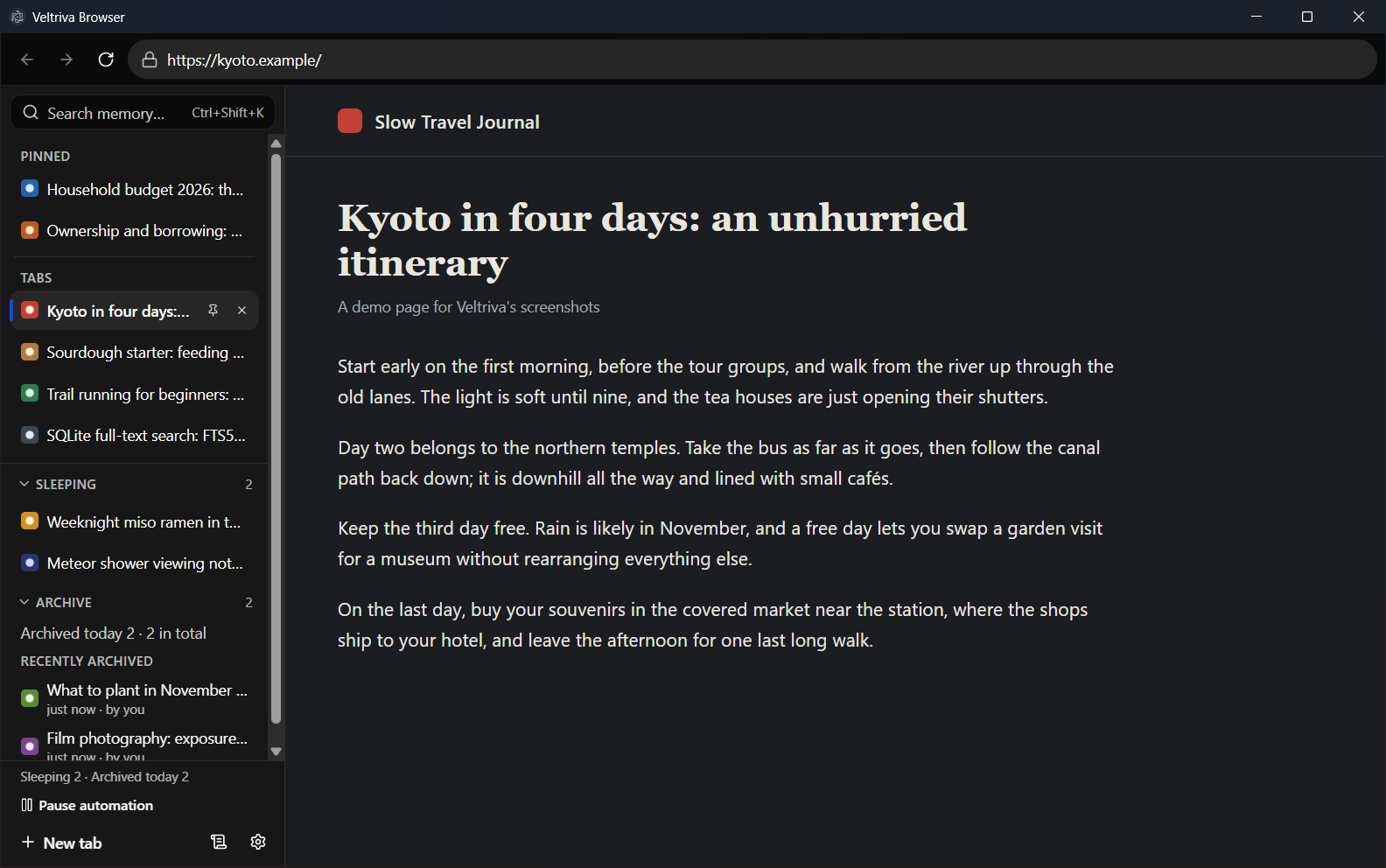
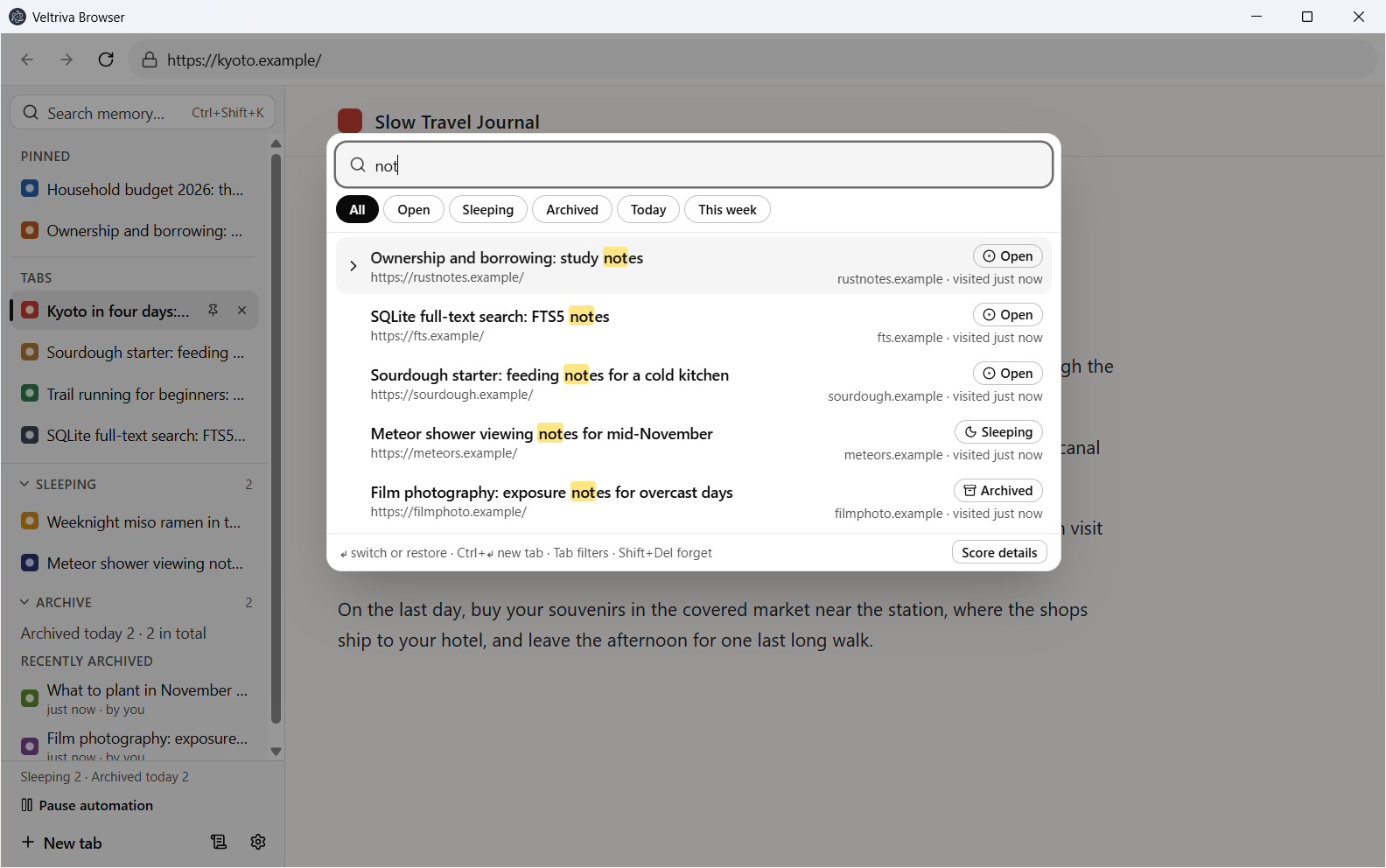
Veltriva is a Windows browser for people with too many tabs. It quietly puts unused tabs to sleep, files old ones away, and finds pages you have visited from a few letters of their title or address.
The real app
Idle tabs cost almost nothing
In testing, unloading 99 of 100 open tabs cut memory use from about 3.8 GB to under 0.4 GB.
Easy to get back
Every automatic tidy-up can be undone, and one search covers open, sleeping and archived pages.
Private by design
No account, no sync, no tracking. Your history stays on your computer.
- Windows 10 and 11
- Open source
- Search in about 10 ms across 50,000 pages
How it's builtElectron, React, SQLite
- Hidden tabs are unloaded to free their memory. With 100 tabs of the same test page open, unloading 99 of them cut memory use from 3,771 MB to 383 MB, freeing about 34 MB per tab.
- Memory search runs on SQLite full-text search and answers in 10.3 ms at the 95th percentile across 50,000 pages.
- Hardened Electron: security fuses set, no preload script inside tabs, a written security review, and CodeQL in CI.
- Crash recovery with a safe mode after two crashes, plus unit, end-to-end, accessibility and benchmark suites.
fig. 03 — bible study companion
Emmaus
AlphaA Bible study companion that shows its sources.
Read Scripture in four translations and ask questions as you go. Every answer points to the exact verses behind it and says plainly whether a claim is stated, inferred, disputed or speculative.
The real app
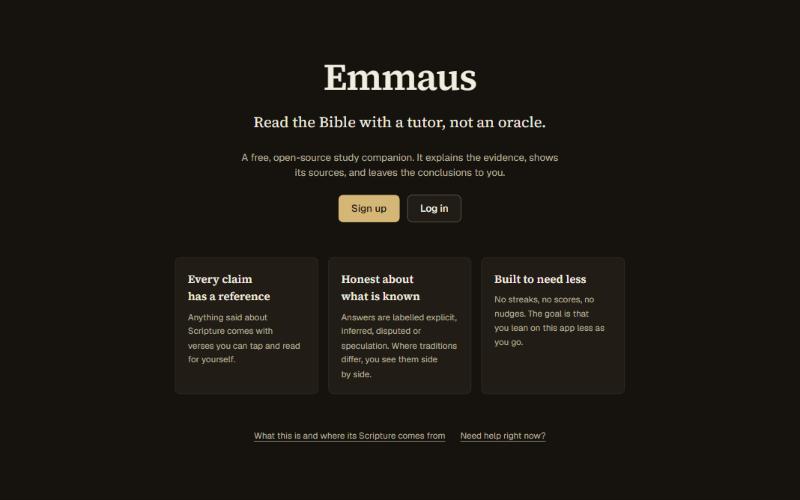
Answers you can check
Claims carry tappable verse references, and anything the text doesn't settle is labelled as such. It is a tutor, not an oracle.
Honest about disagreement
Where traditions differ, it lays the readings side by side instead of picking a winner.
Calm by design
No streaks and no scores. Your notes and prayers stay private.
- Web app, installable on a phone
- Four public-domain translations
- About 2,850 automated tests
How it's builtNext.js, React Native, Postgres
- Answers are built from retrieved passages. Each claim gets a label for how strongly the text supports it. A claim given as plain fact with no verse behind it, or one citing only verses outside those passages, is marked as unsupported.
- On study questions, a second model checks the answer against the passages and can ask for a rewrite. A safety layer screens for distress before the tutor replies.
- About 2,850 automated tests across the core, web and mobile packages, with end-to-end runs in CI.
- Scripture ships inside the mobile app as SQLite for offline reading. Only openly licensed sources are used.
fig. 04 — grammar visualiser
SyntaxLab
PreviewSee how a sentence is built.
Type a sentence and SyntaxLab draws its grammar: which words belong together and what each one is doing, with every label explained in plain English. Built for language students and their teachers.
Diagrams in seconds
Phrase trees, word-relationship arcs and a word-by-word breakdown, all linked together.
No chatbot guesswork
Every analysis comes from an established grammar parser, with its measured accuracy published.
Practice built in
Exercises that point out the rule you missed. In English for now, with Filipino planned.
- English and Filipino
- Open source
- Accessibility-audited on every page
The website is up, but the parser behind it isn't hosted yet, so it can't analyse sentences online. The demo here shows example analyses in the parser's own format, and the source is open.
How it's builtNext.js, Python, Stanza
- Analyses come from Stanza and calamanCy, established open-source parsers. SyntaxLab runs its own evaluation of them and publishes the results, including where they fall short.
- The Algorithm Lab runs an Earley parser written from scratch and verified against a brute-force oracle.
- Every page is audited against WCAG 2.2 AA in CI, and each diagram has a keyboard path and an equivalent table.
fig. 05 — maths tutor
Calculus Solver
In developmentA calculator that shows its work.
Type a calculus problem and get the full worked solution, written the way a good teacher would: each step names the rule it used and shows the algebra before and after.
Steps, not just answers
Thirty-nine kinds of problem, from derivatives and integrals to limits, each with the reasoning.
Checked twice
Every answer is checked against a direct calculation before you see it.
It can make the video
Turn any solution into an animated explanation, with a spoken voice-over on Windows.
- 39 problem types
- Every answer double-checked
- Runs on your own machine
How it's builtPython, SymPy, Manim
- A rule engine produces the steps, and a catalogue of 145 named rules and theorems tells you which law each step used. Every final answer is cross-checked against SymPy before it is shown.
- Solutions can be rendered as animations with Manim, with a voice-over on Windows. A companion renderer lets a hosted page produce the video on the visitor's own PC.
- Works offline, with no cloud service, no account and no telemetry. When you are online, the web page loads its maths lettering and fonts from public sites. Without a connection it shows the maths as plain text.
fig. 06 — developer tool
Veyra
BetaAn undo button for software teams.
Developers track every change to their code with a tool called Git. It is powerful, but one wrong command can wipe out hours of work. Veyra works with the same projects and adds a safety net: the last thing you did can be undone.
Undo the mistake
Every action is journaled, so even a destructive command can be reversed with one more.
Nothing to migrate
It reads and writes standard Git projects, so a team can try it today and stop any time.
Warns before it's too late
Blocks leaked passwords from being saved and shows what a change will affect.
- Windows, macOS and Linux
- Open source
- Version 1.3
Version 1.3.2 · released October 23, 2026 · all files
For developers: install from a terminal
Windows (PowerShell)
$ irm https://raw.githubusercontent.com/RMV-Coder/veyra/main/install/install.ps1 | iexmacOS and Linux
$ curl -fsSL https://raw.githubusercontent.com/RMV-Coder/veyra/main/install/install.sh | shHow it's builtRust
- Reads and writes Git's on-disk format unchanged, so Git and Veyra can work on the same repository in either order.
- Every command that changes something is journaled, and the working tree is checkpointed, untracked files included, before anything destructive runs.
- Written in Rust, with the test suite running on Linux, macOS and Windows in CI.
- Commit-time checks block staged secrets, and semantic diff and impact analysis explain what a change touches.
fig. 07 — developer tool
OmniGraph
PublishedA map of how your software fits together.
Point OmniGraph at a software project and it draws an interactive map of how every part connects. A new developer, or a manager who needs the big picture, can see the whole system at a glance.
The whole system on one screen
Follow a thread from a button on the page down to the database behind it.
Speaks many languages
Reads projects written in TypeScript, Python, PHP, Go, Rust and Java.
Your code stays put
It runs on your own machine. Nothing is uploaded anywhere.
- Published on npm
- Open source
- Six programming languages
For developers: install from a terminal
Any system with Node.js
$ npx @zoldia/omnigraph --path .How it's builtTypeScript, Node.js
- Reads TypeScript and JavaScript as full syntax trees and the other languages with lighter pattern rules, and recognises framework structure such as routes, controllers and models.
- A local server draws the graph with a live watch mode, and a CLI answers questions like "what depends on this file?".
- Published on npm as @zoldia/omnigraph.
fig. 08 — ai workout coach
AetherForm
In developmentA coach that counts your reps and corrects your form.
AetherForm watches you exercise through a camera, counts every rep and tells you the moment your form slips. It is built to run on a small computer at home, so the video never leaves your house.
Hands-free counting
It counts squats, push-ups, curls and raises on its own, and times your planks.
Cues while you move
"Chest up." "Go a little deeper." Shown on screen and spoken aloud, right when it matters.
Private by design
Your video is analysed at home and never uploaded. The AI coach is optional and stays off until you add your own key from an AI provider. Once on, it sends that provider text summaries, plus any meal photo you choose to send.
- Up to four cameras for a 3D view
- Seven camera-tracked exercises
- Android app
Built for one person training at home, not for gyms. Not published yet.
How it's builtPython, MediaPipe, React, Raspberry Pi
- Pose estimation is built for a Raspberry Pi 5 and so far has been tested on a laptop. Reps are counted from joint angles: a squat counts when the knee passes below 100 degrees and returns above 155.
- Two to four calibrated cameras are fused into a single 3D view of the lifter.
- The Android app works without the hub and can count reps on the phone itself. Frames and keypoints never leave the device.
next on the bench
Need one built for your business?
Each of these started as a problem someone had. Tell me yours and I'll tell you what it would take.
Start a conversation